Building for Web - Godot
Overview
The Skillz SDK for Godot includes a Web backend, so a Godot game can be played in a browser window hosted by Skillz with the same API you use for your iOS and Android builds. A Godot Web build runs inside the Skillz web portal, which loads it in an iframe; the SDK's Web backend is pure GDScript talking to the portal through a small bridge script, and there is no native extension on Web.
This guide walks through the export preset, how to test in the editor and in a browser, and how to package the build for the Skillz Developer Console.
Features
All features of the mobile SDK are available on the web except for:
- Brackets and Real-time Tournaments
- Chat
- Progressive Leagues
- Payment support for Master Card, Discover, and Apple Pay
- Audio API (games will use the SFX and background music of the mobile version)
- Seasons API
- Bot matches (
abort_bot_match()aborts the match instead) - The progression room (
launch_progression_room()returns to the portal) - Match metadata and sync play
Each unsupported call logs a warning instead of failing, so shared game code keeps working.
Integration
Your game code does not change between mobile and web: the same Skillz facade, signals and score reporting apply. The steps to enable a web version are:
-
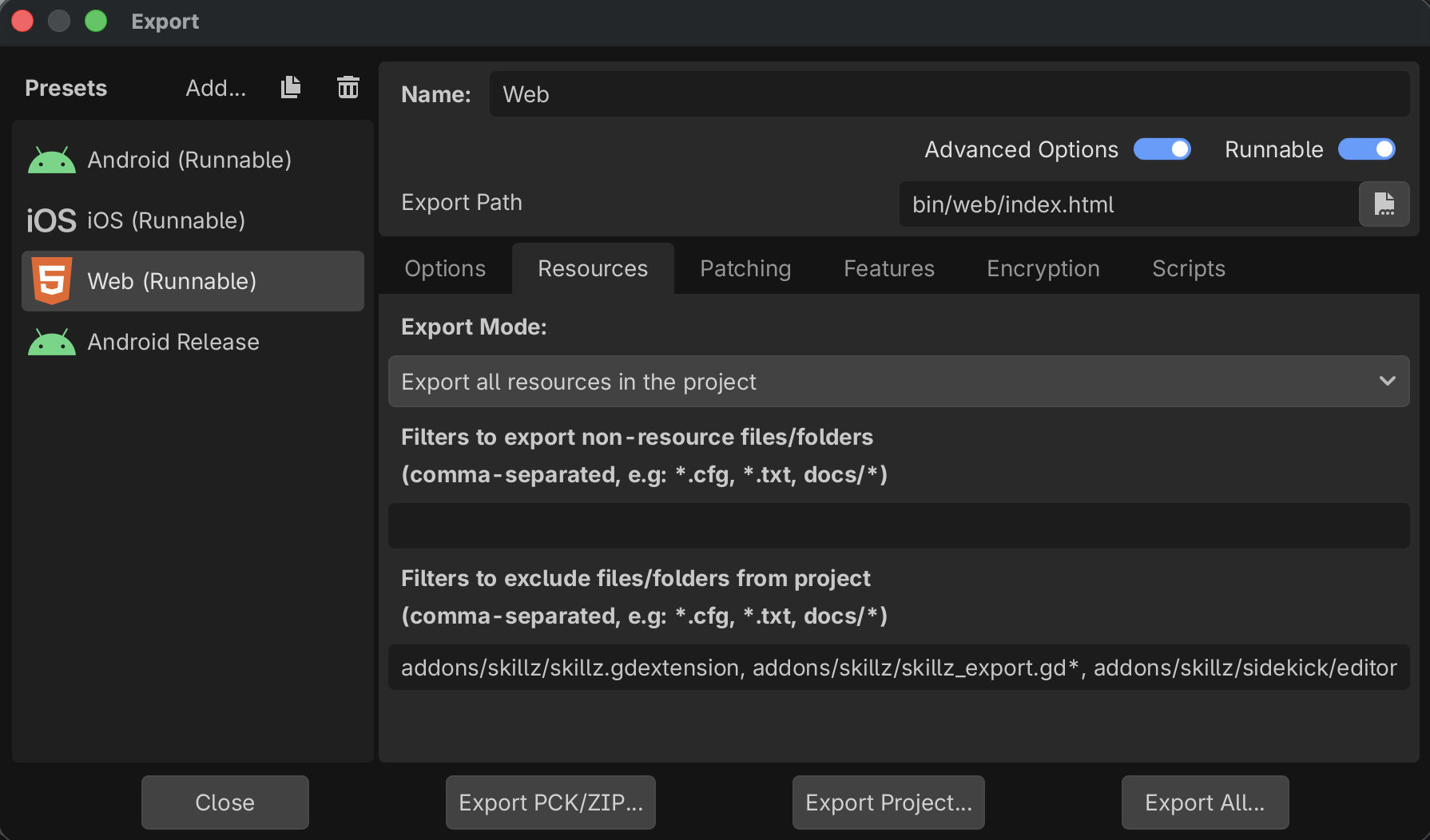
Add a Web export preset. In Project > Export, add a Web preset. The Skillz export plugin applies three settings to every Web preset itself, so they do not appear in the preset's Options tab and there is nothing for you to set:
- HTML > Custom HTML Shell is
res://addons/skillz/web/skillz_shell.html. This shell is how your game communicates with the Skillz portal. - Variant > Thread Support is off. Threads need cross-origin isolation, which the embedding Skillz page cannot provide.
- Variant > Extensions Support is off. The Skillz Web backend is GDScript, so Skillz itself needs no extension; but this switch is for the whole export, so no GDExtension of any kind loads in a Skillz Web build. Godot's Web extension support needs the same cross-origin isolation headers as threads (Exporting for the Web), and the Skillz page cannot send them, so there is no supported way to turn it on. If your game uses another GDExtension, give it a GDScript fallback and branch on
OS.has_feature("web").
Two settings are yours to make:
- Resources > Filters to exclude files/folders:
addons/skillz/skillz.gdextension, addons/skillz/skillz_export.gd*, addons/skillz/sidekick/editor/*. The native extension is not used on Web; the plugin also skipsskillz.gdextensionon Web exports, so the filter mainly keeps the editor-only scripts out of the pack. - Application > Config > Version in Project Settings: set it. It is part of the build fingerprint.
- HTML > Custom HTML Shell is
-
Environment is not a build setting on Web. The Skillz page that loads the build decides whether it talks to sandbox or production, so one build can be uploaded to either. The export prints a line saying that
skillz/environmentis not applied to Web builds. -
Call
launch_skillz()on start-up if you do not already. The Skillz Web SDK assumes your game is ready to receivematch_will_beginas soon as it has loaded.
Be sure to skip any pre-Skillz launch user experience flows, such as a First Time User Experience (FTUE) or game tutorial. As described in our Tutorial Best Practices, we recommend games have this occur just before the player's first match.
- Optional: tab-hidden behaviour. Browsers stop rendering a hidden tab, and on return the engine would deliver one frame covering the whole time away. The SDK freezes game time while the tab is hidden and resumes it afterwards (
skillz/web_freeze_when_hidden, on by default). If your game keeps its own wall-clock timer, handleNOTIFICATION_APPLICATION_FOCUS_OUTandNOTIFICATION_APPLICATION_FOCUS_INyourself. Two details of the freeze: the first frame after the tab returns runs_process(0.0)and_physics_process(0.0), so guard any division bydelta; andSceneTree.pausedis never touched, so your own pause menu keeps working.Engine.time_scaleis global: if your game changes it (slow motion, say) while the tab is hidden, your value is kept rather than restored. Setskillz/web_freeze_when_hiddentofalseto opt out.
Testing
Testing in the Editor
Press Play in the editor: Skillz SIDEkick for Godot simulates the whole tournament loop with no server, which covers the game logic you share with the mobile builds.
Testing in a Browser
Export the Web preset to a folder and serve it from a local web server (Godot's Remote Debug > Run in Browser works). Without a Skillz page around it the shell shows no lobby: the game loads, logs [SkillzShell] game <id>, SDK <version>, host none (not embedded by a Skillz page) in the browser console, and Skillz.get_instance().is_available() is false. That is expected; it verifies the export itself. A real match requires the build to be loaded by the Skillz portal, which is what the sandbox upload below gives you.
Browser Lifecycle
These behaviours are defined by the SDK and need no code:
| Case | Behaviour |
|---|---|
| Page refresh mid-match | The match is dropped and the game starts with none; the next entry starts a new match. The interrupted match stays open on the server until its abandon timeout. |
| Tab hidden | Game time freezes and resumes where it stopped. |
| Tab closed | Resolved on the server by the abandon timeout. |
| Back navigation in the portal | Your game receives skillz_will_exit; reset your scene there. |
| Cannot start (no WebGL2 or WebAssembly) | The shell shows "This game can't start in this browser" and reports the reason to the portal. |
| Any other load failure (missing file, bad download) | The shell shows "This game couldn't load" and reports the reason to the portal. Both load failures are logged as [SkillzShell] ... in the browser console. |
Packaging for the Developer Console
The Developer Console takes the exported Web build as a zip:
- In Project > Export, export the Web preset into an empty folder with the file name
index.html. Godot writesindex.html,index.js,index.wasm,index.pckand the audio worklet scripts there; the Skillz export plugin addsskillz_web_bridge.jsnext to them and stamps yourskillz/game_idintoindex.html. - Zip the contents of that folder, so those files sit at the root of the zip with no enclosing folder.
- Upload the zip through the Developer Console as the game's Web build.
The fingerprint rule. The Developer Console fingerprints the sizes of index.pck, index.js and index.wasm inside the zip; the Skillz portal fingerprints the sizes it is served. They must be the same files, so always upload the zip through the Developer Console and let it deploy the files; do not copy a different export, or a recompressed one, to the hosting location by hand. Sandbox skips the check; production rejects every score on a mismatch.
Troubleshooting
- Scores rejected on production but fine on sandbox. A fingerprint mismatch: the files served are not the ones in the zip the Developer Console registered. Export again and upload the new zip through the Developer Console, so the registered sizes and the served files come from the same export.
- Blank canvas, or the game never starts. Open the browser console and look for
[SkillzShell]lines: the load-failure reason is printed there and also sent to the portal.skillz_web_bridge.js did not loadmeans the file is missing next toindex.html.
With that, your game is ready to publish on https://games.skillz.com. Please have a look at our Web Publishing guide for details on how to get your game hosted on the Skillz web site, and review our Web Best Practices for tips on how to ensure a great player experience.
If you encounter any issues, please export your browser console log, and reach out to us at integrations@skillz.com.